Unlock a Warm, Cinematic Glow with Neo Golden Shine Actions
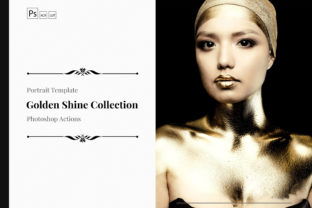
Have you ever looked at a photo from a top-tier travel blogger or a high-end fashion campaign and wondered how they get that specific, sun-drenched look? It’s often a mix of good light and sophisticated color grading. The Neo Golden Shine Color Grading Photoshop Actions are designed to bring that exact feeling of warmth, luxury, and cinematic depth to your own images. This isn't just a simple filter; it's a carefully crafted tool that manipulates light and color to create a signature style that feels both modern and timeless.
The personality of the Neo Golden Shine style is confident and inviting. It leans into rich, golden tones in the highlights and midtones, while often introducing deep, complementary shadows that add a layer of sophistication. Think of the last hour before sunset, where everything is bathed in a soft, flattering light. This action emulates that environment, enhancing skin tones to look healthy and radiant, and giving landscapes and cityscapes a beautiful, atmospheric haze. The overall appeal is one of elevated realism—your photos look like a better, more polished version of the moment you captured.
Where This Color Grading Truly Excels
The versatility of the Neo Golden Shine Color Grading Photoshop Actions makes them a valuable addition to any creative toolkit. Their warm, luminous quality is a natural fit for projects where you want to evoke emotion and establish a distinct mood.
- Brand Identity & Marketing: For entrepreneurs and small business owners, consistency is key. Applying this action across your product photography, team headshots, and lifestyle images can instantly create a cohesive and professional brand identity. It’s particularly effective for brands in the wellness, beauty, fashion, and lifestyle spaces that aim for a premium, approachable feel.
- Editorial & Publishing: Bloggers and content creators will find this action invaluable for creating a signature look for their websites and magazines. The consistent grading helps in building visual hierarchy, guiding the reader's eye through a story with a unified aesthetic. A series of articles or a photo essay gains immense impact when tied together with a single, strong color story.
- Digital & Social Media Graphics: In the fast-scrolling world of social media, a distinctive look helps with recognition. The Neo Golden Shine style can make your Instagram grid or Pinterest pins stand out, offering a polished, professional quality that encourages engagement. It works beautifully for both static images and video thumbnails.
- Personal Projects & Portfolio Curation: For photographers and hobbyists, it’s a fantastic way to curate a portfolio. Applying it to a series of travel photos, family portraits, or even pet photography can unify disparate shots into a compelling narrative with a high-end finish.
Practical Guidance for Using the Action
Getting the most out of any design asset requires a bit of know-how. Here’s how to integrate the Neo Golden Shine Color Grading Photoshop Actions into your workflow effectively.
Evaluating Fit and Testing
Not every image will react the same way. The action is designed for versatility, but it shines brightest with photos that have a decent amount of natural light to work with. Before committing to a large batch, test it on a few representative images from your project. Pay close attention to how it affects the most important elements. For portraits, check the skin tones. For product shots, ensure the colors of your product remain accurate while still benefiting from the overall mood. The beauty of this creative font of color grading is that it’s fully editable; you can tweak the layers to dial back the effect in specific areas or adjust the overall intensity.
Considering Readability and Hierarchy
In web design or editorial design, the graded image often sits alongside text. The warm, mid-tone-heavy look of Neo Golden Shine generally provides a softer backdrop for text overlays than a high-contrast, cool-toned grade. However, always test for readability. Place your headline text over a sample image and ensure there’s enough contrast. The action’s style naturally supports visual hierarchy by creating a clear subject (often the warmer, brighter area) and a more subdued background, guiding the viewer’s focus.
Streamlining Your Workflow
The primary promise of any Photoshop action is time saved. Once you’ve tested and confirmed the Neo Golden Shine action works for your project, you can apply it with a single click across dozens of images. This is a game-changer for large batches, like a wedding shoot or a product catalog, ensuring every image meets the same high standard of professionalism. Remember, the action is a starting point. The final, manual tweaks you make are what will perfect the image for its specific context, whether it’s for packaging design or a personal blog.
Ultimately, the Neo Golden Shine Color Grading Photoshop Actions are more than just a time-saver; they’re a tool for crafting a specific, desirable aesthetic. By understanding its characteristics and applying it thoughtfully, you can infuse your projects with a consistent, warm, and engaging visual language that resonates with your audience and elevates your work.